 Mageloom FX
Desktop VFX generator for game developers. Version 0.5, early access
Spell effects for your game, made on your desktop.
Mageloom FX generates spell and impact effects, plays them on a 3D stage between a caster and a target, and exports sprite sheets, a Godot 4 scene or a Unity 6 prefab you drop straight into your project. Or skip the sheet: Live 3D plays the effect inside Godot or Unity itself, sharp from any camera.
- macOS. Windows and Linux in beta.
- Works offline. No telemetry, no account.
- You own every effect you export, royalty-free in your games.
- 40 starter effects, a first-run tour and a sample Godot project.
Generate
Twelve candidates per click
Pick a family, a material and a style, then press Generate. You get twelve different effects from one seed, each with a thumbnail. Keep the parts you like and Mutate 12 varies the rest. Or start from one of 40 ready starter effects: fireballs, frost novas, poison clouds, level-ups, heals and buffs.


Materials: fire, frost, arcane, storm, venom, radiant, shadow, holy, steel, earth, and the liquids blood, water, acid, slime, ichor and poison, which splash and pool instead of glowing. Add your own materials beside them. Styles: refined, heroic, wild, grim, enchanted. The ground family is a lingering loop on the floor: burning ground, poison cloud, frost patch, holy ground.
Three looks
Match the art style of your game
The same effect in three looks, or anywhere between them with the Mix slider. Switching look keeps your sliders. Below: a frost impact and a fire nova, four frames each.
Cinema
mix 0, the default
Glowing additive light with bloom. Reads well on dark scenes and in action games.


Blend
mix 0.5
Half way. Painted bodies come in at half strength and the Cinema glow stays on top.


Painted
mix 1
Fat soft-edged shapes with a dark rim and light held below white. Made for hand-painted games.


Painted is tuned for fire and frost novas, projectiles and impacts. Other families get it as a preview today.
Cast stage
See it hit something before it ships
Effects play on a 3D stage with a caster and a target. The caster winds up, the spell leaves the staff, crosses the gap and lands, and the golem reacts. You judge timing and scale the way a player will see them.
- Choose where it lands: on the caster, on the target, on a spot on the ground, or attached to a hand, staff tip, chest, head or feet.
- Move the figures: drag to change the distance, Alt drag to turn. Travel time and gap update as you go.
- Five cameras: Side, Shoulder, Orbit, Solo and Bake, the exact angle your sheet will use.
- Three backdrops: on Grey and Daylight the stage shows the effect the way the exported sheet will blend in your game.
- Your own characters: import a .glb, .gltf or .obj to stand in for the caster or the target and judge the scale against your game.

Designer
Take any effect apart
Design opens the effect you picked as a stack of elements: flame crowns, shock rings, embers, smoke, decals. Change any of them by hand, or with one click.
- Quick buttons: click an element and press Full ring, Half ring, Bigger, Faster, Hotter, Recolour, Duplicate or Mirror. Each is one undo step.
- Handles on the stage: drag a ring's size, its opening and the way it faces, right on the effect.
- Layers: hide, lock, solo, reorder, or add from 32 ready pieces. Click on the stage to select one.
- Keyframes: key any value and shape it as a curve on the timeline.
- Library: save presets and reuse them across effects.

Shapes
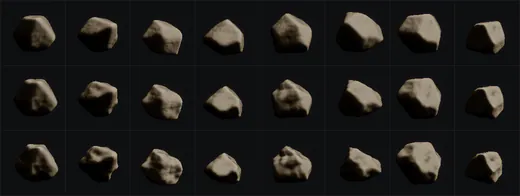
Shards and crystals can use a parametric shape instead of a fixed mesh. Start from rock, crystal, shard or sphere, then set lumpiness, facets, stretch, flatness, jaggedness, cracks and crack glow. Molten cracks cool over a shard's life. The preview turns while you edit, and your shapes live in a library you can reuse. Or import your own piece from Blender as .glb, .gltf or .obj.

Godot 4 and Unity 6
From the app to your scene in three steps
Link an effect to your Godot project once. After that, every save updates it in place. Two ways to ship it: a sprite sheet scene, or Live 3D.
Choose your project
Press Export, pick Godot and Link to project, then point it at the folder with your
project.godotand a target in theres://tree.Link the effect
Sheets write a scene, a script and an
fxforge.jsonwith the pivot, look and where the effect lands. Godot Live 3D writes the effect's own particle tracks and shaders instead, and Godot plays it itself.Keep working
Every save re-exports linked effects. If a change would break your scenes, it asks: new folder or overwrite.

Live 3D: the effect plays inside the engine
A sheet is flat and locked to one camera. Live 3D replays the effect from its own particle tracks with Mageloom FX's shaders ported to Godot (4.4 or later, Forward+, Mobile and Compatibility) and to Unity 6 (URP and the Built-in Render Pipeline, new in this release). It turns with your camera, has real depth, and stays sharp at any distance. No bake, no GPU needed to export.
Unity 6, or another engine?
Unity 6 (early access): write straight into your project's Assets, or export a zip. Sprite sheets import as a 2D prefab and a 3D prefab per effect, Live 3D as a single file Unity imports as a prefab. Both have Play, Release and a Finished event, and exporting again updates in place and keeps every reference. HDRP is not supported yet.
Anything else: export a sprite sheet (PNG plus a JSON of its grid) or a PNG sequence for any engine. Sizes go from 256 px at 24 FPS up to 512 px at 30, and the export panel shows the grid, the sheet size and the memory before you bake.

Game controls
Drive every effect from your game code
Each Godot and Unity export, sheet or Live 3D, comes with the same controls, so one fireball can be a poison bolt, a small one, a slow one, or a light in the room.
- Recolour at runtime: a hue shift keeps the brightness (about 120 degrees turns fire green), a tint multiplies, or recolour by the effect's own light from a dark and a bright colour.
- Scale and speed: one property each, quads or particles, decal and light included.
- A real ground decal: the floor part of the effect (scorch, pool, frost ring, sigil) as a decal that lies on slopes and steps.
- A real light: keyed from the effect's own lights, so the fireball lights the wall it hits.
- Events:
impacton the hit beat,hold_started,releasedandfinished. Play a sound, deal damage, free the node.
# a fireball exported as Godot Live 3D
const FIREBALL := preload("res://fx/mageloom-fireball-7-live/fireball_live.tscn")

func cast_poison_bolt(target: Node3D) -> void:
    var fx := FIREBALL.instantiate()
    # fire turned green, a little smaller
    fx.hue_shift = 120.0
    fx.effect_scale = 0.8
    fx.free_when_finished = true
    # a sound on the hit
    fx.impact.connect($HitSound.play)
    add_child(fx)
    fx.global_position = target.global_position
The same names in C# for Unity: hueShift, effectScale, Impact, Finished. The rig data is engine-neutral JSON too, for any other engine.
Pixel art and directions
For 2D, top-down and isometric games
The same effect baked small and cut to a few colours with hard edges, or from 4 or 8 camera directions, one sheet row each.
- Pixel-art mode: 16 to 128 px per frame, rendered at 4x and boxed down so a spark keeps its pixel. A palette picked from the effect, Mageloom 16 or 32, or your own
.gplor.hexfile. Optional dithering and a 1 px outline. Hard alpha, nearest filtering set in the engine for you. - Direction sets: 4 or 8 directions at a true isometric, 2:1, top-down or side pitch. Godot scenes and Unity prefabs come with a
set_directionhelper that picks the row from a vector. - Live preview: the Export panel plays the pixel frames at their own rate before you bake.

AI agents
Your coding agent can make effects too
Everything the app does is also a command. fx runs with no window, works on files, and answers in one line of JSON. fx mcp serves the same commands to Claude Code, Claude Desktop or any MCP client, and a ready skill tells the agent how to use them.
# a grim frost nova, painted look
$ fx gen nova --seed 7 --material frost --style grim \
    --look painted --out /abs/work/a.json --json
# look at 8 frames in one PNG
$ fx preview /abs/work/a.json --out /abs/work/a.png
# brighter, a bit faster
$ fx tune /abs/work/a.json --energy 0.7 --tempo 0.6 \
    --out /abs/work/b.json
# straight into the game: sheets, or Live 3D
$ fx export_godot /abs/work/b.json \
    --folder /abs/game/assets/fx --pixel 48 --directions 8
$ fx export_godot_live /abs/work/b.json \
    --folder /abs/game/fx
Performance budget
Know what it costs before it lands in your game
Press F3. The Performance panel rates the effect at the size you are about to export, green, amber or red, and tells you what to change.
- Sheet
- grid, frames and texture size
- VRAM
- raw RGBA and compressed
- Overdraw
- layers on a pixel, average and peak
- Hints
- for example "lower to 128 px to quarter it"
- Live
- frame time, FPS, GPU time per stage, particles
The same numbers come out of fx perf as JSON, so a build script or an agent can check them too.
Pricing
Pay once, keep it
No subscription and no account. Buy it once and it runs on your machine.
itch.io
- Founder price until the Steam launch, then $29.99
- macOS, plus Windows and Linux in beta, v0.5 early access
- One purchase, all three systems, no licence key
- Every 0.x and 1.x update included
- Sold by Extalia through itch.io
Steam
- Coming after the itch release
- Updates through Steam
- Same app, same features
Web version
- Runs in your browser
- The Classic 2D editor, with its exports
- Try the 3D effects: generate, play and share
- Exporting 3D effects, Live 3D and pixel art are in the app
You own the effects you make. Use them royalty-free in any game you make, commercial or not. You may not resell them as standalone effect packs or asset bundles. Details in the licence. Digital download: no refund once downloaded, so try the free web version first. If the app won't run on your computer and we can't fix it, we refund you within 14 days.
Questions
Is it early access?
Yes. Version 0.5 is the first public release and it is sold as early access: everything on this page works and is checked in real Godot and Unity projects, but some parts are new, such as Live 3D for Unity, and the Painted look is tuned for fire and frost and is a preview on other materials. Every update is free for everyone who bought it, and the roadmap says what comes next.
Which engines does it work with?
Godot 4.4 or later (tested on 4.7) gets a ready scene and script per effect, Live 3D, and a link that updates your project on save. Unity 6 (early access) gets sprite sheet prefabs and Live 3D, for the Built-in Render Pipeline and URP; HDRP is not supported yet. Both engines get the game controls: runtime recolour, scale, a ground decal, a light and events. Any other engine that plays sprite sheets or PNG sequences works too: Unreal, GameMaker, Defold, your own.
Live 3D or sprite sheets: which should I use?
Sheets are flat pictures baked from one camera angle: small, predictable, and right for 2D, pixel art, direction sets and fixed cameras. Live 3D replays the effect inside Godot or Unity from its own particle tracks, so it turns with a free camera, has depth, and stays sharp at any size; it costs some GPU per instance instead of texture memory. The app's Help has a guide, "Which export should I use?", and the sample Godot project lets you switch between the two with Tab.
Does it do pixel art?
Yes. Pixel-art mode bakes a frame at 16 to 128 px, cuts it to a palette (picked from the effect, Mageloom 16 or 32, or your own .gpl or .hex file), with optional dithering and a 1 px outline, and sets nearest filtering in the Godot scene or Unity prefab. Direction sets bake the same effect from 4 or 8 directions for top-down and isometric games, with a helper that picks the row from a direction vector.
Can I use the effects in a commercial game?
Yes. What you export is yours to use in your games, royalty-free. The one thing you can't do is sell or give away the effects as an effect pack or asset bundle on their own.
Does it need the internet or collect data?
No. It runs fully offline and has no telemetry. At first launch it asks whether it may check for updates; if you say yes, it reads one small file from mageloomfx.com once a day and sends nothing about you or your work. If it crashes, the next launch asks whether you want to send a report, which opens a draft email you can read first. See the privacy notice.
How is it different from the free web version?
The free web version has the Classic 2D editor with all its exports, and lets you try the 3D effects: generate, mutate, edit, play them on the cast stage and share links. Exporting 3D effects is in the desktop app, which also adds the Godot and Unity exports, Live 3D, the game controls, pixel-art mode and direction sets, the Painted and Blend looks, the starter effects, the shape editor and mesh import, your own materials, the fx CLI and the MCP server, and works offline.
What does it run on?
A Mac with Apple Silicon (M1 or later) on macOS 13 or newer, or Windows 10 or 11 (64-bit) with a GPU that supports Vulkan 1.2 or DirectX 12. Intel Macs are not supported. Windows and Linux (x86_64, Vulkan) are in beta. The web version is a fair test of whether your machine likes it.
How do I get started?
The first run gives you a five-step tour, and Help has "Start here" guides for your first effect in Godot, in Unity, and which export to use, with code to copy. Help can also create a sample Godot project: open it, press F5, and keys 1 to 6 cast a fireball, frost nova, poison cloud, level up, heal and shield at the target.
How do I get help?
Email [email protected]. In the app, Help, Report a bug fills in the version and system details for you.
Try it in your browser first
The free web version lets you try the 3D generator and the cast stage, and has the Classic 2D editor with its exports. Exporting 3D effects, Live 3D and pixel art are in the app, v0.5 early access on macOS, with Windows and Linux in beta.